
Sitehound Vet
Inventory that runs the practice — not the other way around.
Sitehound Vet is inventory management built for veterinary hospitals. Know what you have, where it is, and what it's worth. Reorder before you run out. Replace the controlled-drug binder with a DEA-ready digital log. Every count, transfer and dispense is recorded with a name on it, on the web or on the floor.

- Built for veterinary practices
- DEA-ready controlled substances log
- Integrates with your practice software
- Sitehound Vet Mobile for iOS & Android
Trusted by veterinary teams worldwide
Your stockroom is losing you money, and nobody can see it.
Most practices run inventory on a patchwork: a PIMS that's good at billing but weak at stock, a spreadsheet someone keeps updated (most weeks), a paper binder for controlled drugs, and a lot of memory. The result is predictable:
Cash sitting on shelves.
Overstock nobody notices until it expires.
Stockouts at the worst moment.
The vaccine you thought you had, gone the morning of a full appointment book.
Charges that never make it onto the bill.
Product leaves the shelf and never reaches an invoice.
Compliance anxiety.
A DEA inspection means hours with a binder and a calculator, hoping the balances add up.
Sitehound Vet replaces the patchwork with one system that tracks every unit, every movement and every dollar.
Every unit, every shelf, every dollar.
Sitehound tracks inventory by location, from the hospital down to the room, cabinet and bin. Each unit carries its location, status, lot, expiry and a full history of who did what to it.
An Inventory Health strip sits at the top of the inventory screen: value on hand, out of stock, low stock, lots expiring in the next 30 days, and dead or slow stock. Click any tile to see the items behind it.
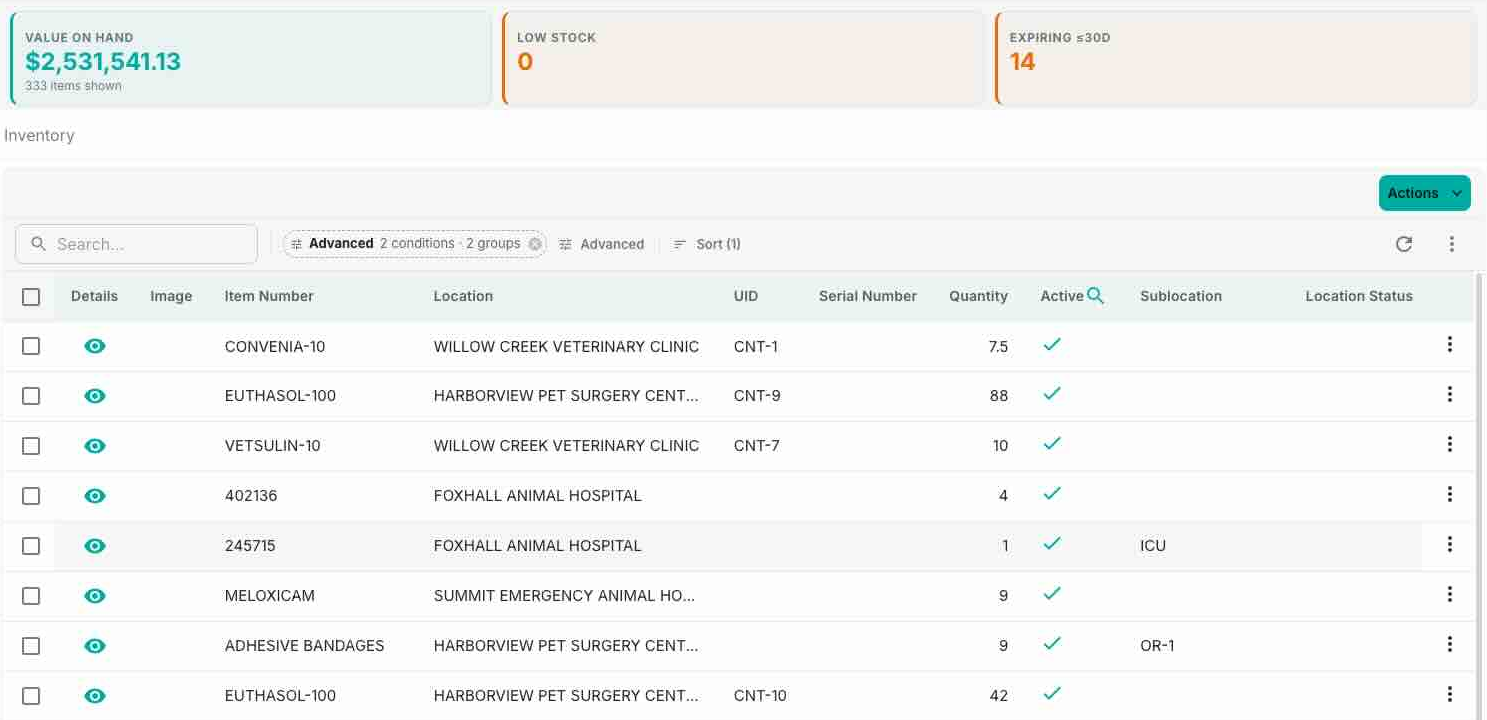
- Location tree: clinics, rooms, cabinets, shelves, vehicles, each holding its own stock
- Serialized and quantity-tracked stock side by side: scan equipment by UID, count bulk drugs and consumables
- Unit conversions: buy by the bottle, stock and dispense by the tablet. Value stays correct either way (a $24 bottle of 250 tablets is worth $24 on the shelf, not $6,000)
- Lot and expiry capture at receiving, with expired stock quarantined automatically each night
- Inventory groups: move a crash cart, surgical pack or mobile-clinic kit as one unit, with nested groups supported
- Reservations and shortages: set stock aside for a scheduled surgery and see every shortfall in one list
- Price history: every cost change recorded, with a sparkline and a badge when a price drifts above its average
- Barcode labels: design label templates once, then print bin tags and shelf labels from any query
Stop guessing what to order.
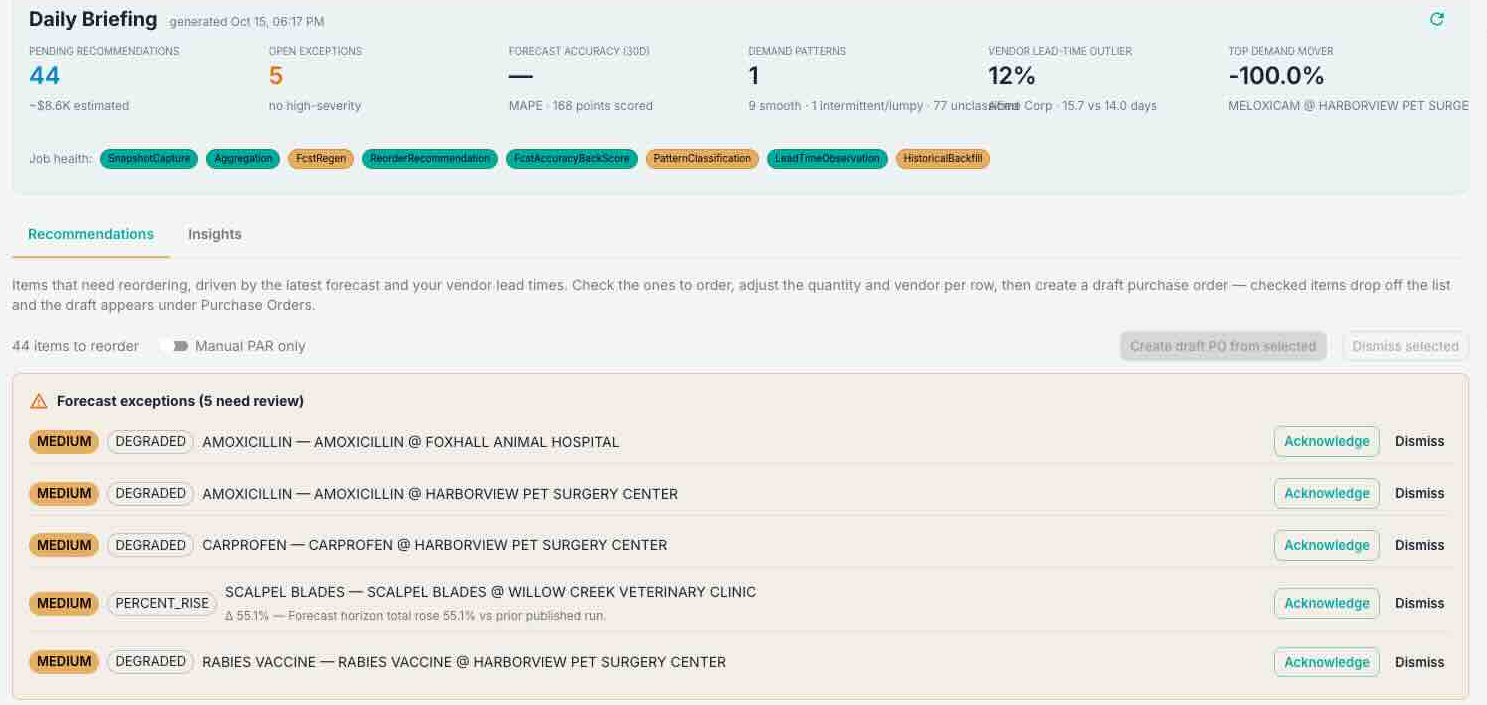
Demand Planning watches what your practice actually uses and turns it into a daily reorder worklist that accounts for lead times, seasonality and your target service level. Tick the items you want, adjust the quantity, pick a vendor, and Sitehound drafts the purchase order. It orders in the units you buy, so 104 tablets becomes 9 boxes, not 104.
- Consumption-based recommendations with editable quantities and vendor suggestions per line
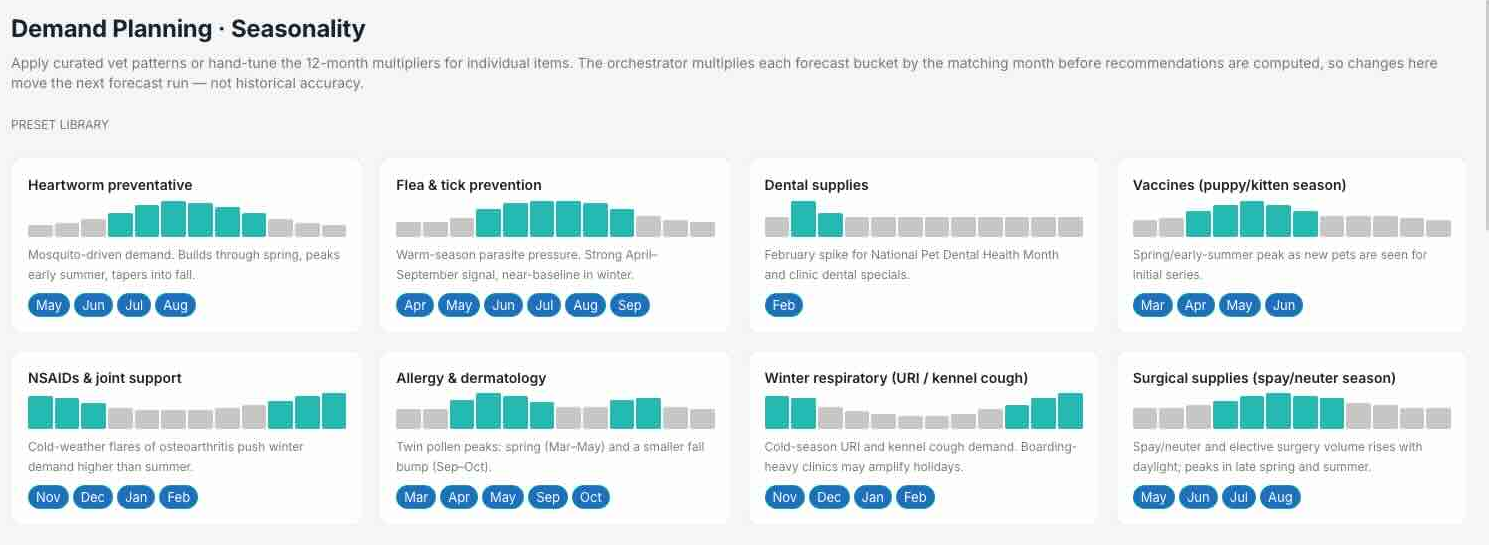
- Built-in veterinary seasonality patterns (heartworm, flea and tick, and others) you can apply to an item or a whole item type
- Vendor items: price, pack size, minimum order and preferred vendor per supplier, bulk-imported from a price list
- Lead-time overrides for special orders, without skewing the vendor's averages
- Snooze items that are backordered or out of season; alternative items when your usual product is unavailable
- Manual PAR ordering from your own numbers when you'd rather set levels yourself
- Trend and accuracy views so you can see how the forecast compares with what actually happened
- Cost visibility is its own permission: let staff plan and order without seeing the dollars
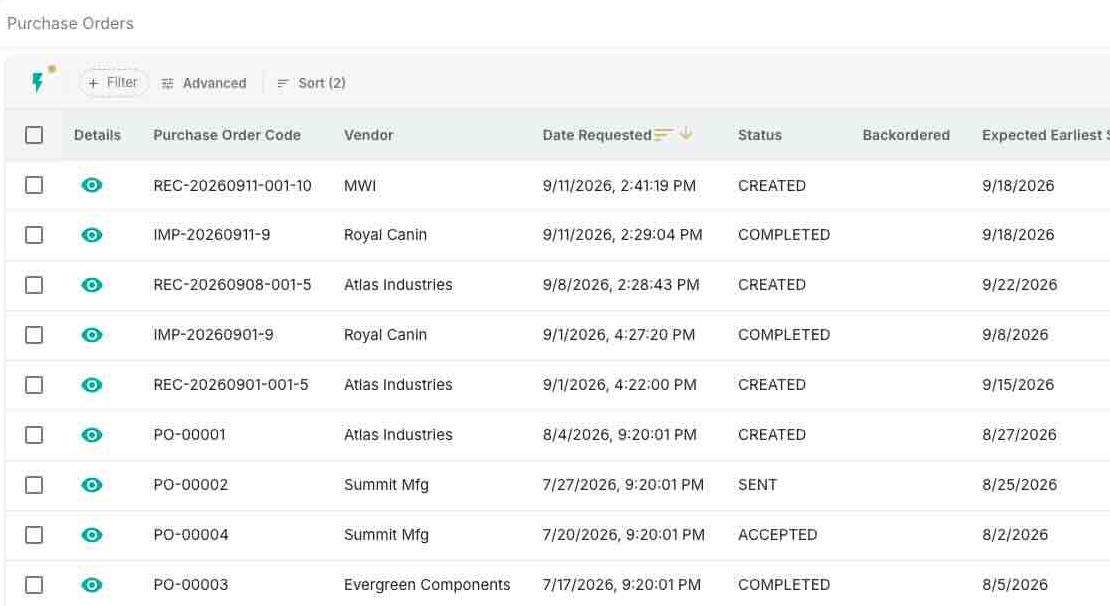
- Create POs by hand, from Demand Planning, or by importing a vendor file: CSV and Excel map column by column, and PDF or Word orders are read by AI
- Item aliases resolve vendor SKUs to your catalog, so imports don't create duplicate items
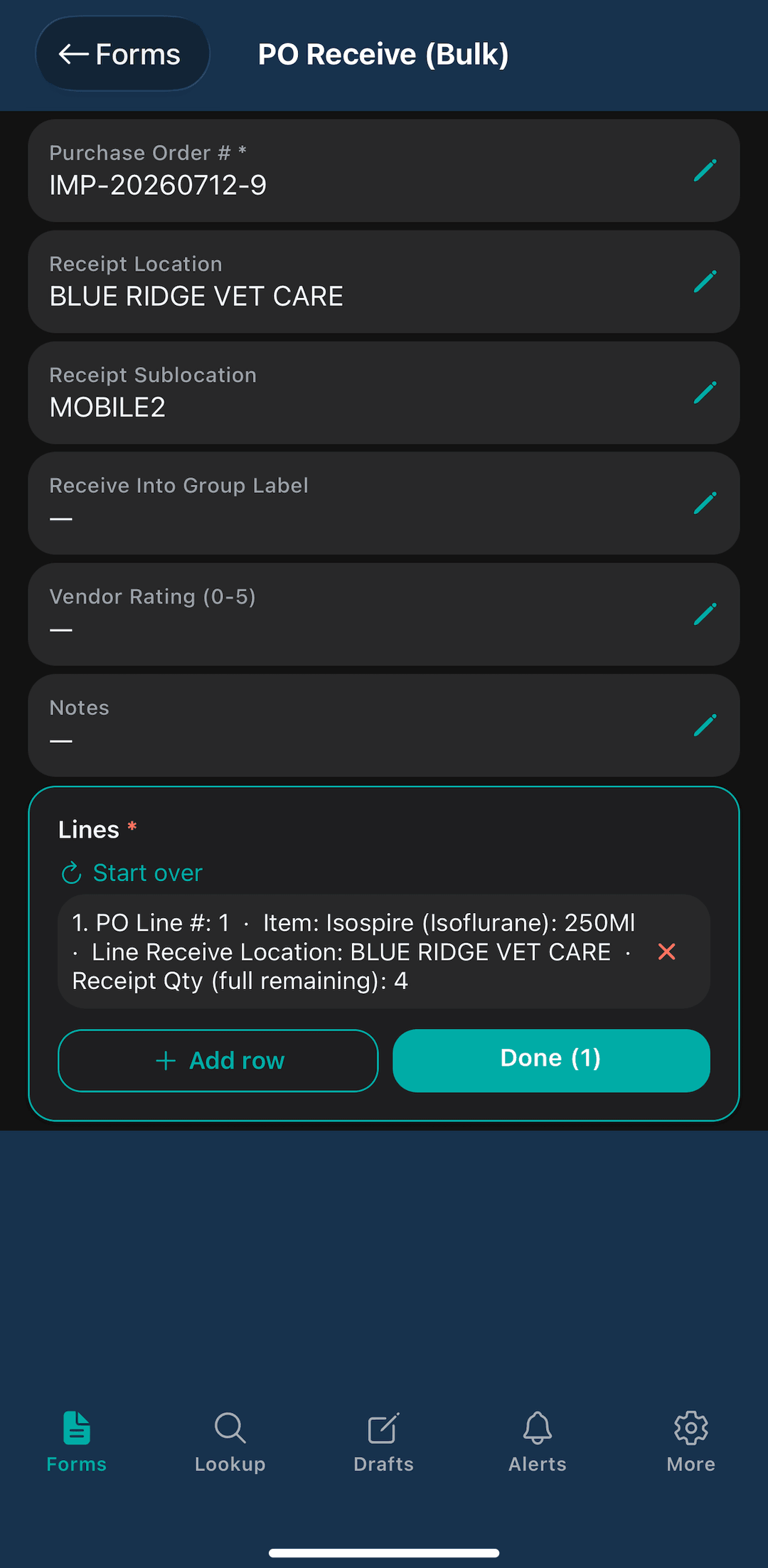
- Receive in bulk, row by row, with per-line sublocation, lot and expiry
- Over-receipts go to quarantine automatically; backorders past their promised date are flagged
- Returns and credits: return expired or recalled lots to the vendor straight from the expiry list (Hill's and Purina food credits included)
- PO line prices keep item costs up to date automatically
Vendor portal
Supplier access, built in
Give your vendors and suppliers their own portal access, so purchase orders, deliveries, and supplier communication live in one place instead of scattered across email and phone calls. Each supplier's pricing, pack sizes, and lead times stay attached to the items you buy from them.
The DEA log your inspector wants to see.
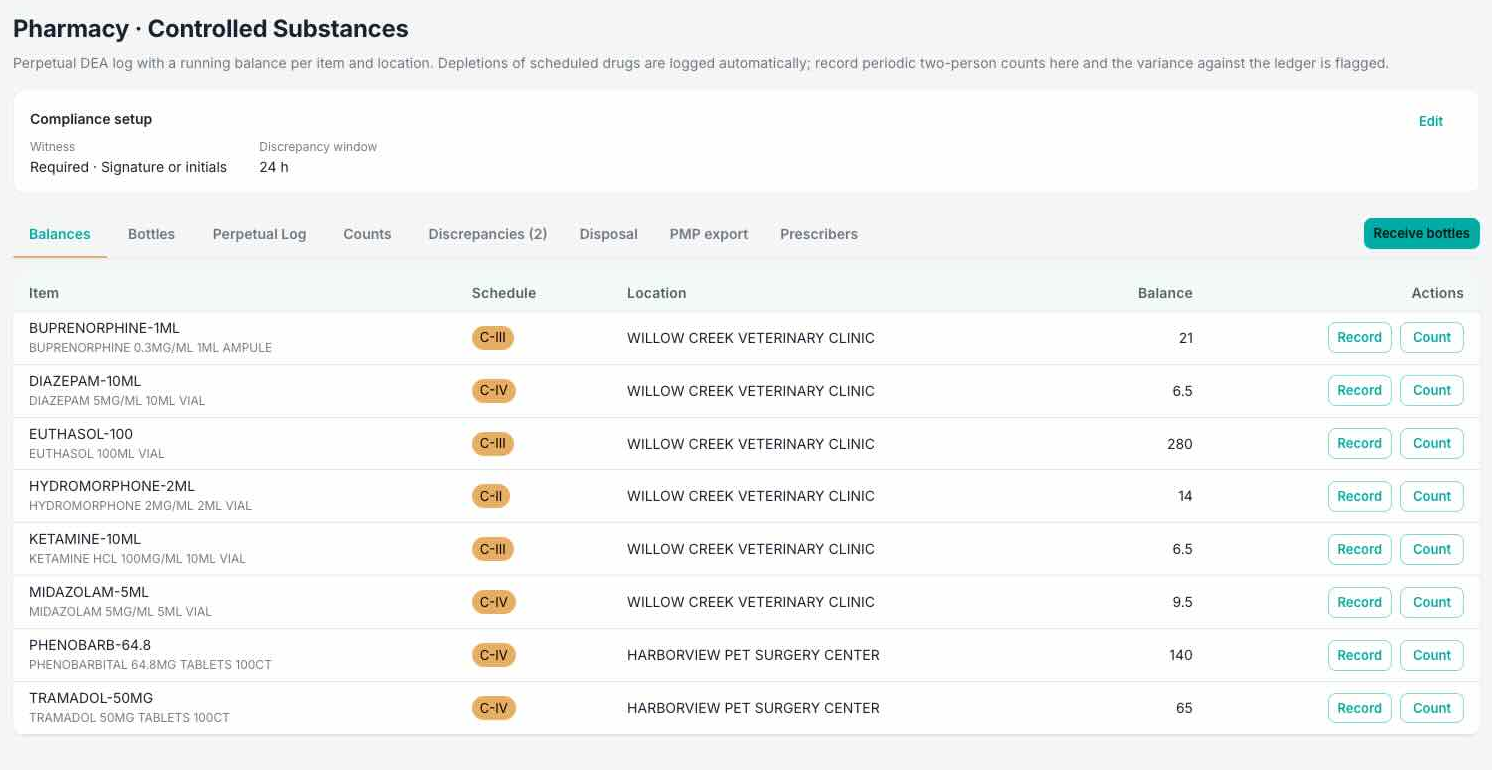
Set a DEA schedule on an item and from then on every receipt, transfer, dispense and waste is written to a perpetual log with a running balance, per drug, per location. The ledger is the custody record: if the ledger write fails, the inventory action fails too. Nothing is skipped.
- Numbered bottles: every sealed bottle gets a YY-N number and a scannable label at a witnessed receipt, which can close a PO line in the same step
- A witness on every access: dispense, waste, return, open, transfer and dispose, each signed by the person and their witness (drawn signature or typed initials)
- Dispense and waste per patient and prescriber, with species, reason and patient required where the DEA record needs them
- Witnessed counts: shift, cycle and biennial inventory. A count that doesn't match raises a discrepancy for someone to explain; it never silently rewrites the balance
- Missing bottles are caught: a numbered bottle an audit expected and never saw automatically opens a discrepancy
- State PMP reporting: generate the ASAP 4.2 file for take-home dispenses in states that require veterinary reporting, then track each submission from submitted to accepted or rejected
- Working alone: let the DEA registrant on a house call or farm call record without a witness. Each entry is clearly marked, and destruction always needs a witness
- Guardrails: controlled stock can only move through witnessed actions, and injectables can never be returned to stock
“Show me what you have, what you've used, and who handled it.”
Every Checklist. Every Shift. Signed Off.
Every hospital has opening and closing checklists: mop the floors, check the crash cart, throw out blood tubes older than a week, run the autoclave. On a clipboard they get skipped, on a whiteboard they get wiped, and nobody can say who did what. Sitehound Vet Tasks puts them on a board where every task is due at a time, stays there until someone signs it off, and records who signed it off and when.
Build the lists your hospital actually runs, assign each task to the role qualified to do it, and require a photo where it matters. Every day's list is kept, so you can look back instead of starting from a blank board.
On Its Own
Sitehound Vet Tasks App
Just the task board, for practices that want accountable checklists today without changing how they run inventory. It runs on the front-desk PC and on every phone and tablet.
Inside Sitehound Vet
The Task Lists Module
Switch it on next to inventory, controlled substances and work orders. It uses the same logins, roles, locations and alerts, so the nightly controlled-drug count sits on the same board as locking up.


Stop Hunting for Another Set of Hands.
You're in the back with a patient and you need another set of hands, but you can't let go to go find someone. Press a page button and the call goes out to the front desk: an alarm or a light, a message in the app, or a text. Everyone in that role is alerted at once, with your note attached. The first person to press “I'm on it” takes it, and everyone else gets back to work.
Set up buttons for the calls your team makes most: an extra pair of hands in treatment, an OR flip before the next surgery, help in ICU, a witness for the pharmacy.
Extra hands needed in treatment
Paged Front Desk · “Holding a patient, need help now”
Nothing Gets Quietly Skipped.
A task appears whether or not anyone opens the board, and anything still open carries over to today marked Overdue. “Not done” needs a reason, and editing a task never rewrites what was asked on days already worked.
How It Works
Set it up once. The board runs every day.
- Due at a Time: every day, chosen weekdays, or a one-off date, in the location's time zone.
- Signed Off by Name: Done, or Not Done with a reason. Each sign-off records who, when and any note.
- Photo Proof: any task can require a photo before it's marked done, so “done” means done. On a phone, the camera opens.
- Page Buttons: call for extra hands, an OR flip or ICU help, and everyone in the role is alerted by alarm or light, in-app message or text. “I'm on it” lets the rest stand down.
- Right Role, Right Task: each task shows whose job it is (the tech, the vet or the practice manager), so it goes to someone qualified to do it.
- A Record to Look Back On: pick any day to see what was due, who signed it off, the photos, and why anything wasn't done.
Catch it before it reaches a patient.
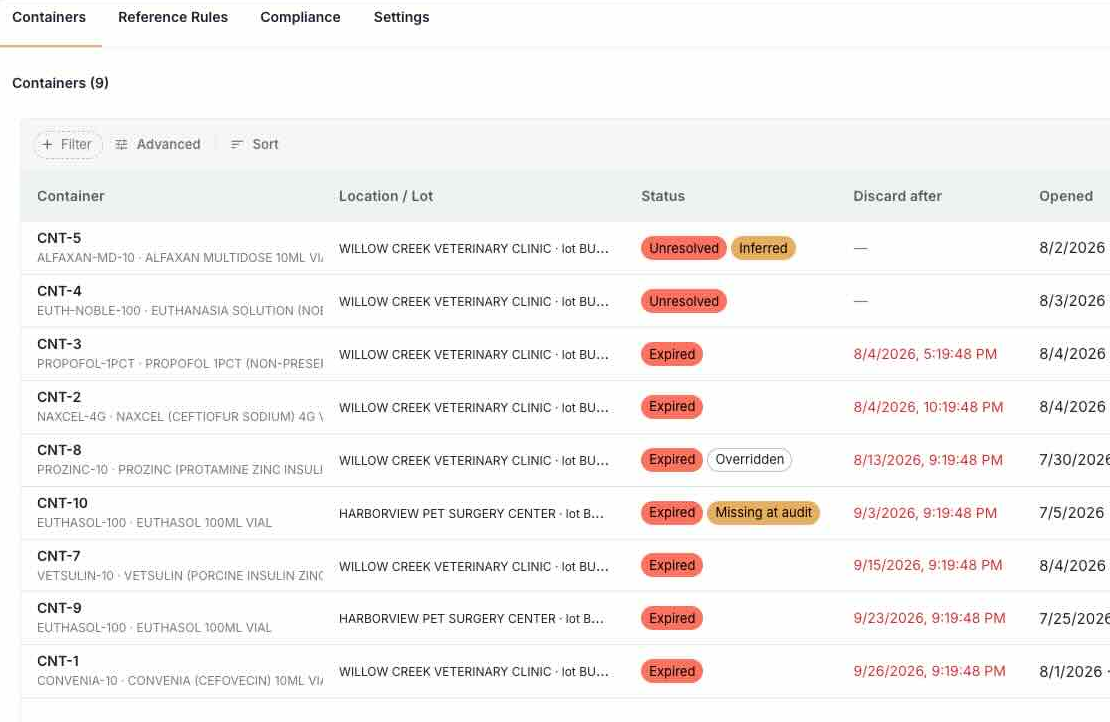
Beyond-use dates (BUDs)
The date on the box only applies while the product is sealed. Once a vial is punctured, reconstituted or taken out of the fridge, Sitehound starts its in-use clock. The container gets its own label with a discard-after date and time, and scanning an expired container is blocked on both web and mobile. Rules come from product labeling and USP compounding standards, and your practice reviews them before anything takes effect. When several rules apply, the shortest wins, and no date is ever set past the manufacturer's expiration.
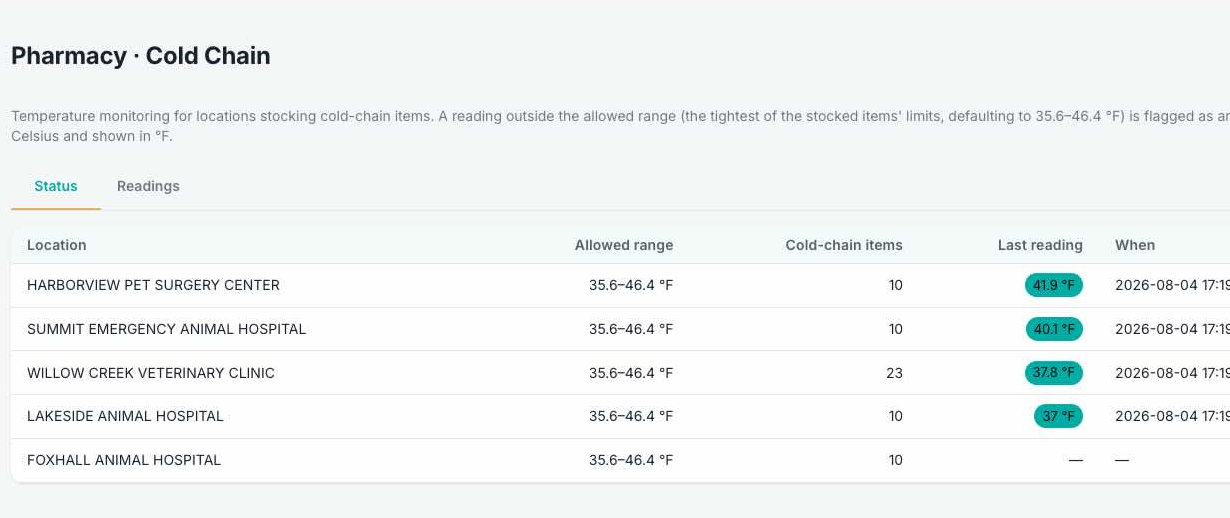
Cold chain
Log fridge and freezer temperatures per location. Each location's allowed range is set by the tightest range among the items stored there, and any reading outside it is flagged as an excursion so the stock gets checked before it's used.
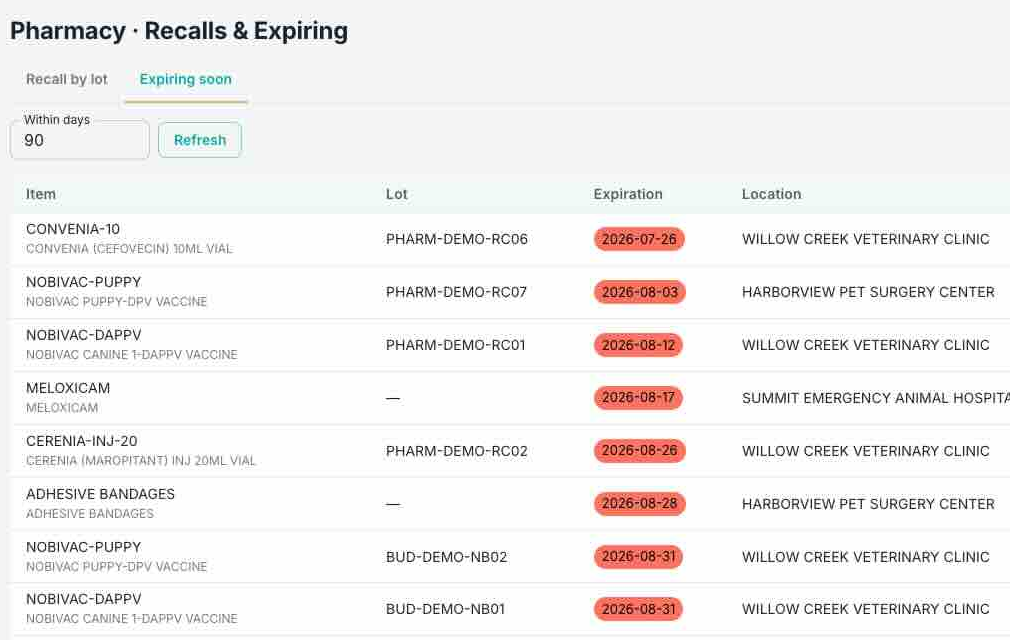
Recalls & expiring
Type a recalled lot number and see every on-hand unit carrying it, with item, location and quantity. A separate expiring worklist ranks aging stock by units and dollars at risk, with one-click return to vendor.
The numbers your accountant asks for, without running a report.
The Financial dashboard gives owners and practice managers the money view of inventory, calculated from data Sitehound already tracks. Hover any tile to see exactly how it's calculated.
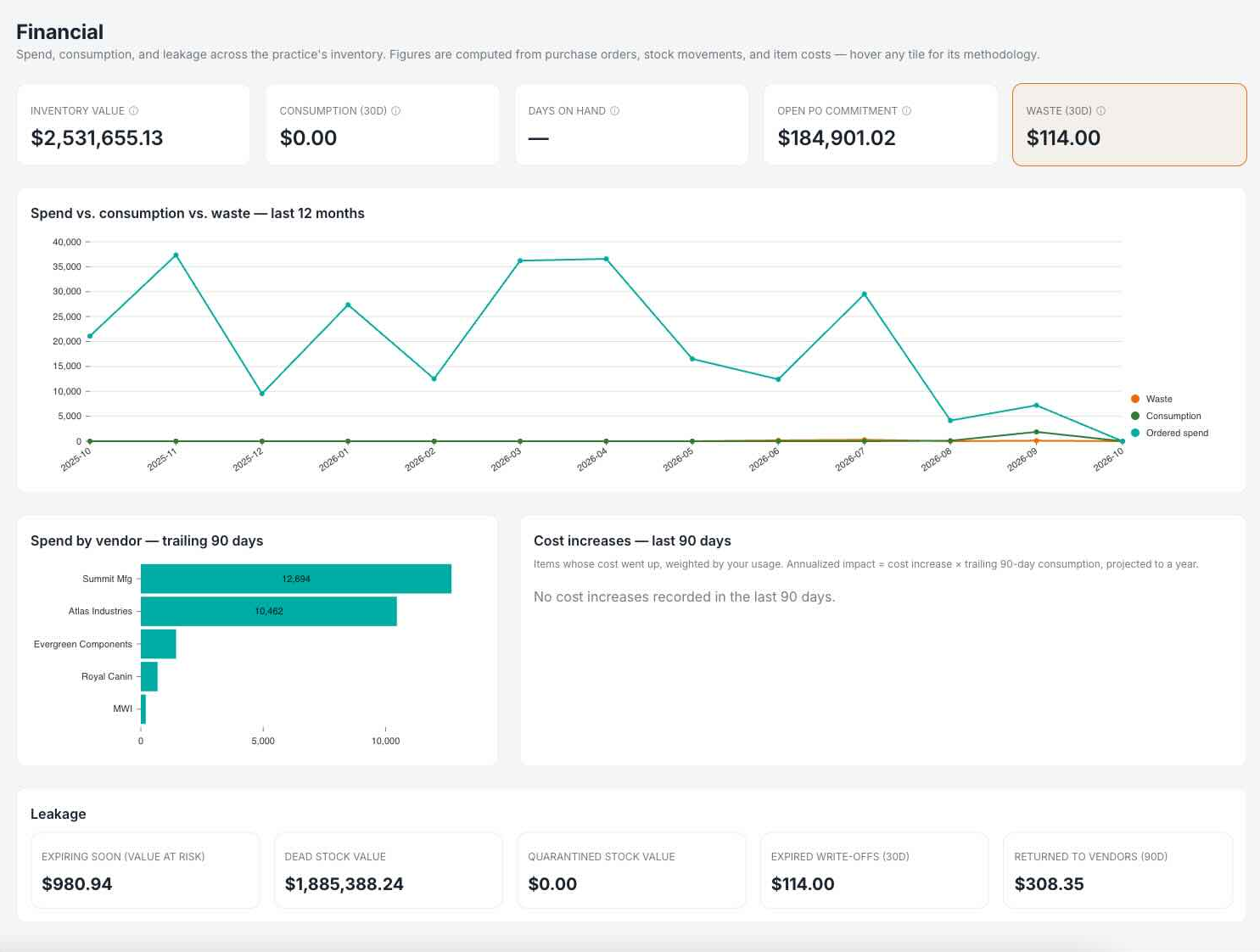
Inventory value
The cash on your shelves.
Consumption (30 days)
Your cost-of-goods proxy, meaning what actually left the shelf.
Days on hand
The single best “is inventory well-managed?” number (most practices target 30–45).
Open PO commitment
Money already spent that hasn't arrived yet.
Missed charges
Product billed in your practice management system whose stock never came off the shelf, or the reverse. Charge capture, with a dollar figure on it.
Waste (30 days)
Expired and disposed stock, at cost.
Also on the dashboard
- Spend vs. consumption vs. waste, month by month
- Spend by vendor, for negotiation leverage
- Cost increases weighted by your usage, with an annualized impact, so a small price rise on a high-volume item doesn't go unnoticed
Built for gloved hands and bad signal.
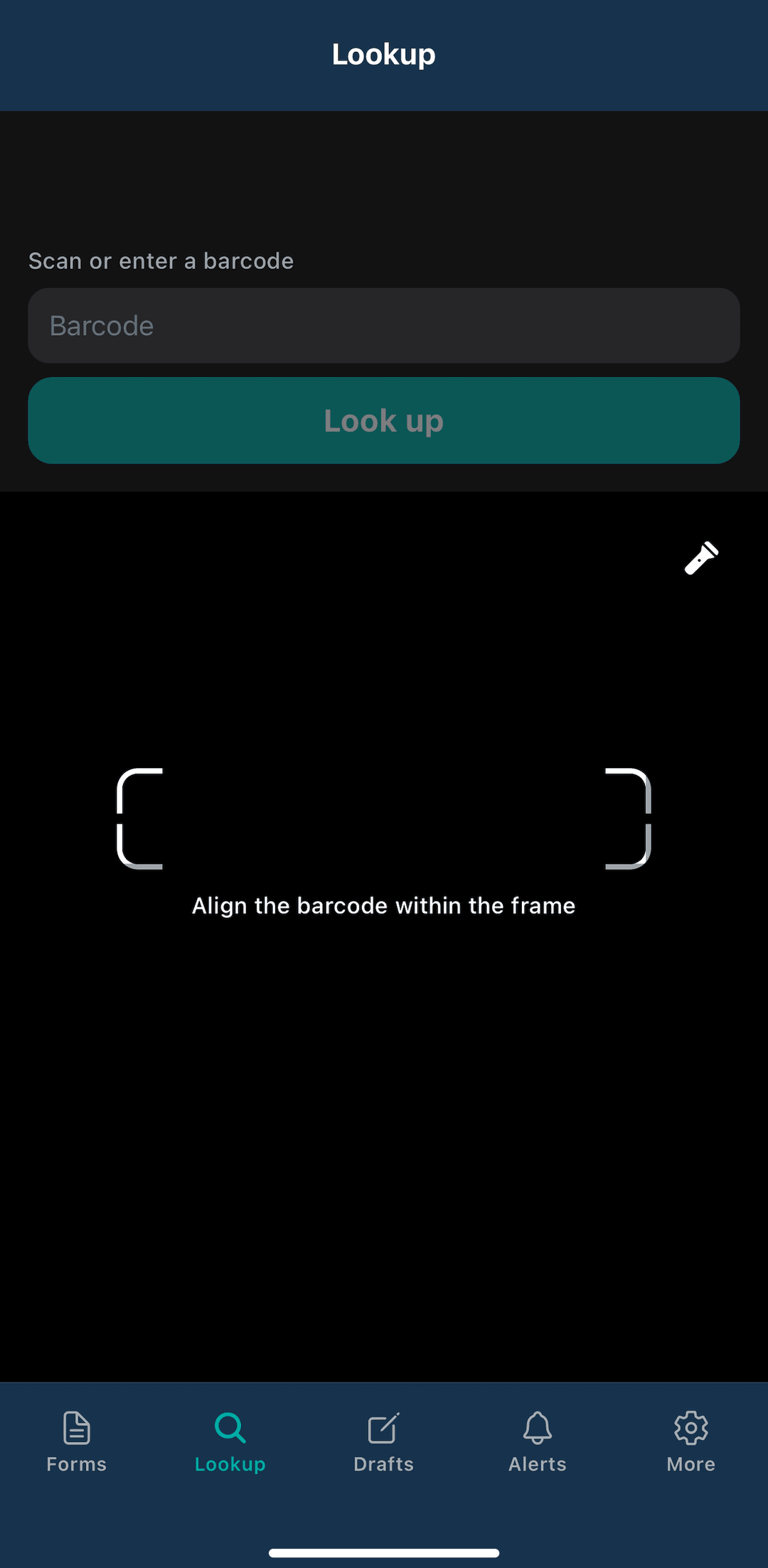
Sitehound Vet Mobile, the companion app for iOS and Android, puts scanning, counting, receiving and moving stock in your hand. Every step comes from a guided form your practice configures, one question at a time, so it's usable one-handed next to the patient. Everything you submit lands in the same history as the web app.
- Scan to look up any item, unit or bottle and act on it right there
- Receive POs, transfer, count and audit from the shelf
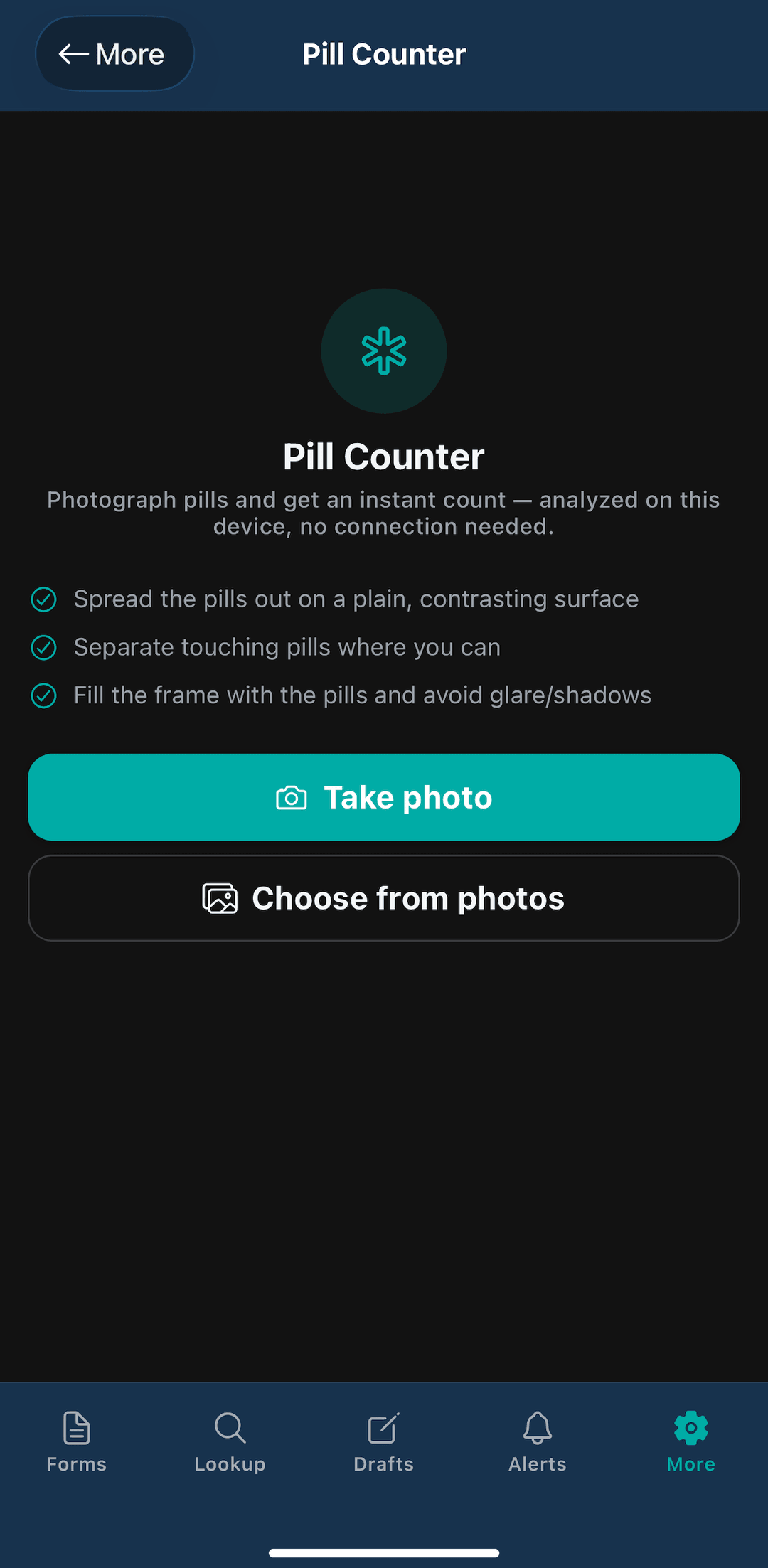
- Camera pill counter: count loose pills from a photo, processed on the device, so it works offline and no image leaves the phone
- Works offline: finished forms save as drafts and submit when you're back in range
- Controlled-drug forms on mobile with signature pad and witness, including farm-call mode
- Face ID / Touch ID sign-in and two-factor support
Your team gets Sitehound Vet Mobile from a private install link during onboarding.
Keep every machine inspected, maintained, and under warranty.
Inventory isn't only what's on the shelf. The anesthesia machine, autoclave, refrigerators, washer and dryer, and even the clippers all need inspections, maintenance, and repairs. Sitehound tracks your equipment alongside your stock, so nobody has to rely on a paper calendar taped to the machine.
- Inspections and maintenance: schedule recurring checks and service for each piece of equipment, and see what's due before it's overdue
- Warranty tracking: keep coverage on record, so you check whether something can be repaired or replaced under warranty before buying new
- Vendor and service records: know who sold it, who services it, and what's been done to it
- Work orders for anything: schedule waste pickup and equipment inspections, track repairs, or just get someone to change a light bulb
- Track every work order from request to completion, with a full history of who did what
Example work orders
- Scheduled
Anesthesia machine — annual vaporizer service
Maintenance · Equipment vendor
Scheduled
- Due this week
Autoclave inspection
Inspection · Recurring monthly
Due this week
- Scheduled
Medical waste pickup
Service · Recurring weekly
Scheduled
- In progress
Exam room clippers — repair
Repair · Checked against warranty
In progress
- Open
Exam room 2 — replace light bulb
Facilities
Open
Ask your inventory a question.
Sitehound AI is an assistant built into the app that answers from your live data and the official feature guides. Ask in plain English and get an answer, a chart or a query. It only sees what you're allowed to see, and anything it drafts is saved as a draft for you to review.
Query Builder
For deeper questions, Query Builder joins datasets (inventory, items, purchase orders and more) through a step-by-step builder, an “Ask AI” mode that shows you the query before it runs, or raw SQL for power users. Save queries and schedule them as emailed reports.
Accurate counts without the year-end weekend.
Cycle counts are scheduled automatically by classification, so high-value, fast-moving items are counted often and slow movers less often. Counters see what's due today, count it, and the system flags variances and asks for a recount when needed. Scheduled and quick audits compare what's on the shelf against a snapshot of what should be there, for serialized and bulk stock in the same audit.
Needs Attention
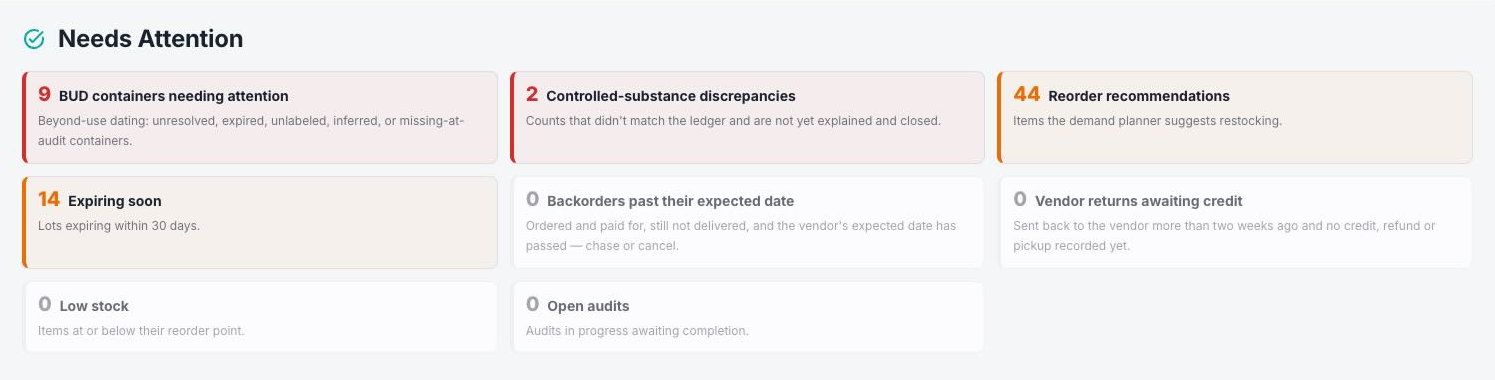
A Needs Attention hub puts everything pending in one place: reorder recommendations, low stock, expiring lots, late backorders, unreturned credits, open audits and controlled-substance discrepancies. Administrators also get a daily briefing when something needs action.
Works with the systems you already run.
Practice management software
- Sync your practice software's product catalog and link products to Sitehound items automatically by SKU
- Deplete stock from prescriptions as they're recorded in your practice software
- Reconciliation reports that show where the two systems agree and where they've drifted
- Charge capture in both directions: billed but not depleted, and depleted but not billed
- Push purchase orders through your practice software to suppliers
- Sitehound stays the system of record for counts. Integrated systems never silently overwrites your quantities, and incoming counts go through an approve/deny step
Drug cabinets and everything else
Manual integrations bring counts in from systems with no live connection, such as Cubex, Omnicell or Pyxis reports, distributor stock lists, or a spreadsheet. Upload a CSV, Excel or PDF file, preview the result, and apply it as a physical count with a full audit trail.
Moving from another system
Data Import brings over your records and their history: users, items, inventory, past activity and demand. Demand Planning can forecast from day one instead of waiting months for usage to build up. Imports can be re-run safely, and nothing is duplicated.
Every action has a name on it.
Complete activity history
Every stock action, approval and count is recorded with who, when and what changed.
Role-based permissions
Down to the action level, including separate rights to view costs, write raw SQL or override a beyond-use date.
Data extraction monitoring
See who exported what and when, with alerts on unusual volume or off-hours pulls.
Single sign-on & 2FA
Single sign-on (SAML) and two-factor authentication.
Multi-location, multi-organization
Each organization's data is kept in its own separate database schema.
Public API
For integrations, with published documentation.
Something for everyone on the team.
Practice owner
Inventory value, days on hand, waste and missed charges at a glance
Practice / hospital manager
One worklist for reorders, expiries, audits, discrepancies and work orders
Inventory lead / purchaser
Demand-planned reorders, PO import, vendor pricing and receiving
Veterinarians & DEA registrants
A witnessed controlled-drug log that works on the farm call
Technicians & assistants
Sitehound Vet Mobile for counting, receiving and moving stock on the floor
Simple pricing, by the people who use it.
One admin user, plus your team in groups of five. Every DEA handler gets a named login.
- Admin user
- $52 / monthor $499.20 / year
- Regular users, group of 5
- $52 / monthor $499.20 / year
Regular users are sold in groups of 5 only.
Available on request: Smart Buttons, pre-printed labels, and scanning hardware.
Questions practice managers ask us.
Practice software is built to bill. Sitehound Vet counts, witnesses and expires stock, and its reconciliation report shows where the two systems agree and where they've drifted, including product that left the shelf and never reached an invoice.
Keep the cabinet. Sitehound Vet imports its reports as a count with a full audit trail, then covers everything the cabinet never touches: the pharmacy shelves, the vaccine fridge, the treatment rooms and the truck.
The log is DEA-ready: every sealed bottle is numbered at a witnessed receipt, every dispense, waste, transfer and disposal is signed by the person and their witness, and balances are perpetual. For states that require veterinary reporting, it generates the ASAP 4.2 PMP file and tracks each submission.
Once a vial is punctured, reconstituted or taken out of the fridge, Sitehound Vet starts its in-use clock and the container gets its own label with a discard-after date and time. Scanning an expired container is blocked on web and mobile, so expired stock can't be used by mistake.
No. Sitehound Vet runs in the browser, and Sitehound Vet Mobile runs on iOS and Android phones. It works offline, so counts and controlled-drug forms on a farm call submit when you're back in range.
Data Import brings over your users, items, inventory and their history, so demand planning can forecast from day one instead of waiting months for usage to build up.
Yes. Sitehound Vet Tasks runs on its own as a checklist and paging app. If you add Sitehound Vet later, your lists, roles and history come with you.
Tasks still appear on their due day. Anything not signed off carries over as Overdue, so a skipped closing checklist shows up as open, not as if it never existed.
Everyone in the role the button is set up for, except the person who pressed it, such as the front desk when you need an extra set of hands in the back. The call can go out as an alarm or a light, a message in the app, or a text. The first person to press “I'm on it” lets the others know it's covered.
Yes. Mark a task “Needs a photo” and it can't be signed off without one. Photos stay with the task for management to review.
An admin user is $52 a month, and regular users are sold only in groups of five, at $52 a month per group. Pay annually and each is $499.20 a year, a 20% saving. Smart Buttons, pre-printed labels and scanning hardware are available on request. Every person who handles controlled drugs should have their own login, because shared logins break a witnessed log.
See your inventory clearly, starting this week.
Book a 30-minute walkthrough with real veterinary data: controlled substances, demand planning, the financial dashboard and Sitehound Vet Mobile.